- Blockpit brings your crypto wallets, exchanges and transaction history together to simplify Dutch tax reporting.
- Review transactions, wallet transfers, missing records and tax classifications before relying on the generated report.
- Check your Box 1 and Box 3 figures, and keep supporting records in case the Belastingdienst requests further information.
You bought Bitcoin on Bitvavo, transferred some to a Trezor wallet and swapped tokens through MetaMask. You may also have transaction records sitting in CSV files from exchanges you no longer use. When it comes to filing your Dutch tax return, bringing all these records together can quickly become complicated.
What did you actually hold on 1 January? Which transactions count as sales, and which were simply transfers between your own wallets? And how should you interpret a tax report that labels some of your transactions as “tax-free”?
This is where crypto tax software can make a real difference. Blockpit brings your wallets, exchanges and transaction history together in one place, making it easier to review your activity and understand how the figures in your tax report were calculated. In this guide, I’ll walk you through how to use it and highlight what to check before relying on the results for your Dutch tax return.
Why I Use Blockpit
In my 18 years as an international corporate and tax lawyer, I’ve tested a wide range of software across Web2 and Web3. Blockpit is one of the tools I personally like for crypto tax reporting. It’s easy to use, the workflow is logical, and I can trace the figures in its reports back to the underlying transactions.
That transparency matters. A report is only as reliable as the records behind it, so I always recommend reconciling your transactions and having the final figures reviewed by a local crypto tax expert. Blockpit’s country-by-country list is a good place to start looking for one. I’ve been repeating myself like a parrot since 2020:
Crypto holders, get your ducks in a row!
Under DAC8 and the OECD Crypto-Asset Reporting Framework (CARF), automatic reporting is getting closer. In the Netherlands, in-scope crypto service providers began collecting data on 1 January 2026 and must first report it to the Belastingdienst by 31 January 2027. Reportable data can include transfers from an exchange to a self-custody wallet, including a hardware wallet. That exchange record can give tax authorities a starting point for asking about your wallet activity.
In the UK, HMRC reportedly sent more than 81,000 crypto “nudge” letters in the 2025/26 tax year, asking taxpayers to check whether they had reported their crypto correctly. I call them “happy letters”. I expect more tax authorities in Europe to ask similar questions as they receive more data. Set aside time in November or December 2026 to download your exchange histories, reconcile your wallets and check earlier returns while the records are still easy to find.
Getting Started
1. Set up your portfolio for the Netherlands
Create an account on Blockpit and select the Netherlands as your tax jurisdiction if it applies to you. As partners of Blockpit, you can register with our referral for a 15% discount.
When you open Reports, select the year you’re preparing.
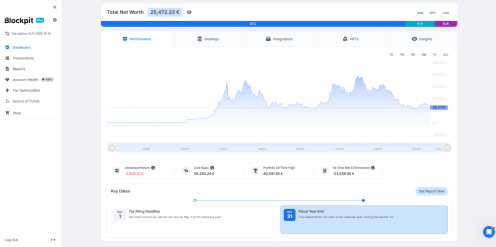
The dashboard shows a portfolio worth around €25,472 in the example. For your Dutch return, you need historical figures for the relevant tax year. For private crypto holdings in Box 3, the Belastingdienst asks for the market value on 1 January at 00:00 of that year. See the Belastingdienst guidance on reporting crypto.
2. Connect your exchanges and wallets
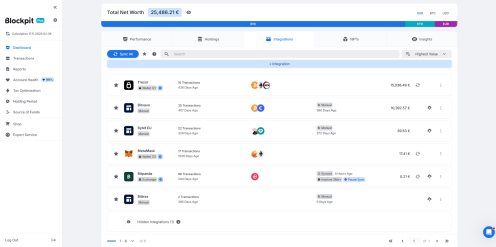
Under Integrations, add the accounts you’ve used. Depending on the platform, you can connect an exchange through an API, add a supported blockchain wallet address, or import a transaction file. The example includes Trezor and MetaMask wallets, a synced Bitpanda account and manual imports for Bitvavo and Bybit.
Start with the accounts you use today, then go back through your older accounts. An empty wallet can still explain where your assets came from. In the detailed 2023 sample report, Blockpit links a March 2023 USDT sale to a purchase in October 2021.
3. Check what actually happened in each transaction
Open Transactions and review purchases, sales, swaps, deposits and withdrawals. If you used DeFi, traded NFTs or received staking rewards, mining proceeds or airdrops, check how those entries were imported and labelled.
Start with transfers between your own wallets. If you send Bitcoin from Bitvavo to your Trezor, you still own the Bitcoin. If only one side appears, import the missing records or match the entries where appropriate. Then check for duplicates, missing prices and balances that differ from your records.
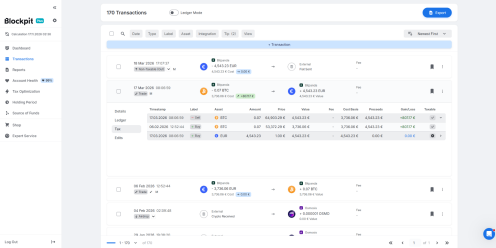
Blockpit traces the sale of 0.07 BTC for €4,543.23 back to an acquisition cost of €3,736.06, giving a realised gain of €807.17. The next day’s euro withdrawal appears as a separate entry.
The Dutch tax question comes next. The Belastingdienst distinguishes ordinary investing and speculation from activities where additional work generates extra income. That extra income may fall under Box 1. Check the facts behind the transaction before relying on the software’s tax label. See the Belastingdienst guidance on crypto holdings.
4. Open Account Health, even if the score is 99%
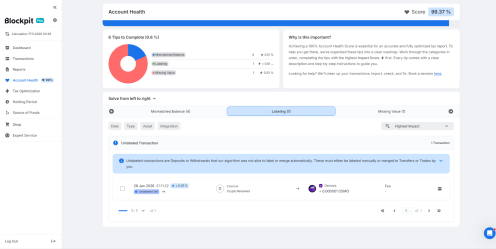
The sample account scored 99.37%. It still had six issues to review: four mismatched balances, one unlabeled transaction and one missing value.
The screenshot shows the unlabeled receipt of 0.000001 OSMO. Its displayed impact was very small. The missing value had a larger impact on the score. Start by reconciling balances with your own records, then check whether any missing prices or labels affect the figures you need.
5. Read the Dutch tax report alongside the transaction details
Under Reports, select the relevant year and review the results before downloading. The 2023 Dutch demo presents the figures as follows.
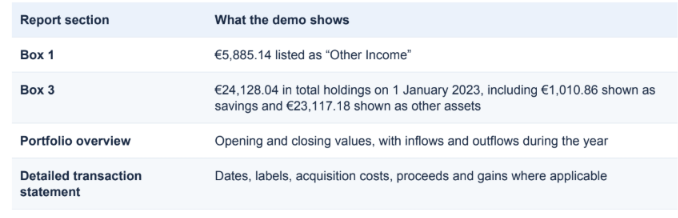
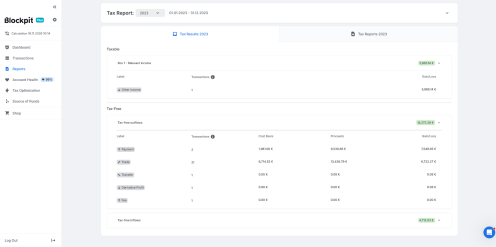
I would start with the figure I need for the return, then work backwards.
If an amount is listed under Box 1, what was the payment for? Was it for services rendered?
Dutch Box 1 covers income from work and home ownership. It includes taxable salary and bonuses, sole-proprietor profits, freelance earnings, pensions and taxable benefits, annuity payments and partner alimony received. For a qualifying main home, it also includes the eigenwoningforfait, an imputed amount, with deductions for qualifying expenses such as mortgage interest. If you receive wages, a bonus or a freelance fee in crypto, record the euro value when you receive it. The nature of the payment determines how you report it.
If a balance is listed as savings, where was the money held? If a trade appears under “Tax-Free,” what does that label mean in the context of the report?
The demo lists some trade and payment gains under “Tax-Free,” while also showing holdings for Box 3. If you’re reporting actual return in Box 3, the Belastingdienst asks for crypto values on 1 January and 31 December and the total value of purchases and sales during the year. It compares actual and deemed return across your total Box 3 assets and liabilities. See the Belastingdienst guidance on reporting crypto and the Belastingdienst guidance on actual return.
6. Keep the records that explain where the money came from
A tax return tells the Belastingdienst what you’re reporting. A bank or exchange may ask a different question later: Where did the funds for this particular transaction come from?
Blockpit’s separate Source of Funds Report illustrates this with a 0.2 BTC withdrawal from Bitvavo. The sample traces about 67% of the withdrawal’s euro value to fiat deposits and about 8% to trading profits. For the remaining 25%, it identifies a crypto deposit whose earlier history is missing. That points you to the records from the wallet or exchange that sent the Bitcoin.
Save the tax report and detailed transaction statement alongside the original exchange exports and wallet records. If a number is questioned later, those records help you show how you arrived at it.
As a practical starting point, keep your crypto records for at least seven years, and keep acquisition records for assets you still hold. Dutch businesses generally have a seven-year legal retention requirement for their core administration. For private investors, seven years is a practical retention target. The Dutch tax authority can generally reassess income tax within five years, and a 12-year period can apply to income or assets abroad. Keep records longer where that extended period may apply.
Make your recordkeeping easier by giving each wallet a purpose. For example, use one wallet for salary or fees received in crypto and another for personal investments. Keep the payslips or invoices, note the euro value at receipt, and label transfers between your own wallets so you can match both sides later.
Before filing, I’d check three things:
- Whether the right wallets and exchanges are included
- Whether the opening balances match the underlying records,
- Whether the tax labels make sense for the activity.
If you’re unsure whether a crypto payment belongs in Box 1, how to calculate your Box 3 actual return, or how to deal with missing records, our team at @O2K can help you review your crypto tax position. Send us an email at info@o2k.tech or schedule a consultation to begin.
Connect with Antonia Eilander MA LLM on Linkedin